Q-Smart laser repair for lidar systems
Use this page when the installed lidar platform is identified as Q-Smart and you need help with startup faults, unstable output, or a practical repair-versus-replacement decision.

Use this page when the installed lidar platform is identified as Q-Smart and you need help with startup faults, unstable output, or a practical repair-versus-replacement decision.
Most Q-Smart reviews begin with the model name, a description of the current fault, and photos of the unit labels or source area. That is usually enough for a useful first pass.
Typical requests involve startup failure, unstable performance, output drift, or a decision on whether the fastest path is repair work, source replacement, or parts support.
Visible labels, a short fault summary, alarm history, and photos of the installed source section usually provide enough context to start the review.
Q-Smart reviews usually begin by confirming the installed unit, then narrowing whether the symptoms point to source instability, startup-related issues, or a faster replacement-path decision.
Equipment labels, installed layout, and recent service history help confirm the exact Q-Smart configuration before the technical review goes deeper.
Startup response, alarm behavior, output changes, and service history help determine whether the issue is centered in the source path or elsewhere in the platform.
Once the platform and symptoms are clear, the next step is usually a practical choice between repair work, source replacement, or targeted parts support.
Use these visuals to confirm that your equipment matches the platform before sending a detailed inquiry.
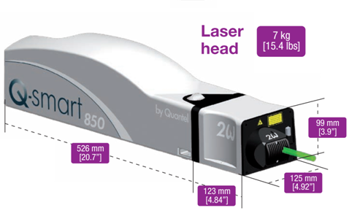
The overall appearance helps confirm the equipment family and installed platform.
You do not need a full diagnosis before reaching out. A clear model reference and supporting files are enough to start a productive review.