Centurion laser repair for lidar systems
This page covers Centurion fault review, unstable output, and recovery planning for that unit.

This page covers Centurion fault review, unstable output, and recovery planning for that unit.
Most Centurion reviews begin with the equipment name, a short description of the current fault, and photos of labels or the source section. That is usually enough to begin a practical first pass.
Typical requests involve unstable performance, restart failures, source-related faults, or a fast decision on whether repair, replacement, or parts support makes the most sense.
Photos of labels, a short fault summary, alarm history, and pictures of the installed source area usually shorten the first round of confirmation.
Centurion reviews usually begin by confirming the installed unit, then narrowing whether the issue points to source aging, platform-side integration, or a faster commercial replacement path.
Equipment labels, installed layout, and any previous service notes help confirm exactly which Centurion configuration is in use before the review goes deeper.
Current symptoms, alarms, startup behavior, and performance drift are used to judge whether the problem sits in the source path itself or in the surrounding platform.
Once the platform and symptoms are clear, the next step is usually a practical choice between repair work, a replacement path, or targeted parts support to restore uptime faster.
Use these visuals to confirm that your equipment matches the platform before sending a detailed inquiry.
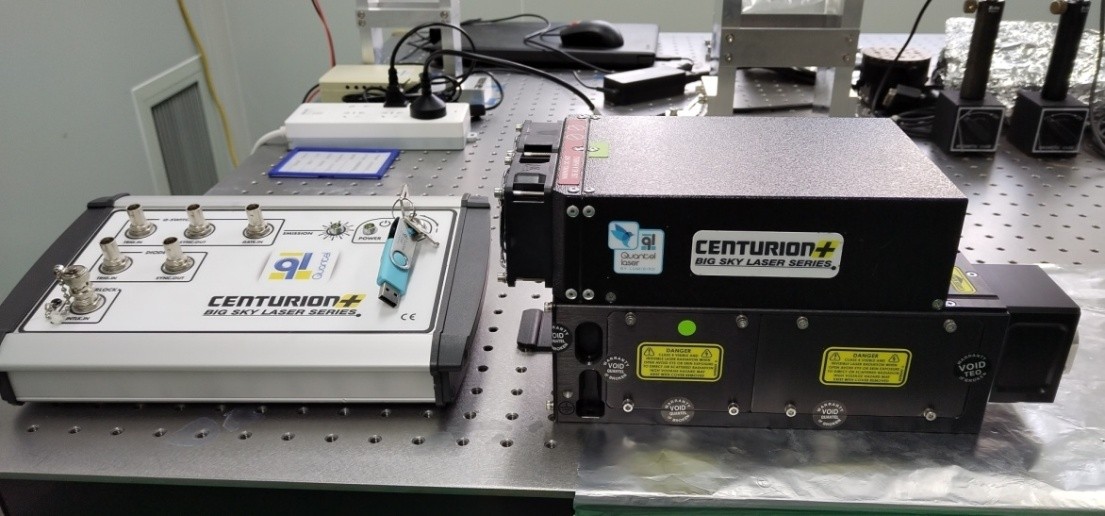
The overall appearance helps confirm the equipment family and installed platform.
These public-facing notes convert recent field feedback into intake guidance. They are not a final diagnosis; they help buyers prepare a clearer first review.
When these symptoms appear, describe the operating state, recent change, alarm behavior, output condition, and whether the issue is intermittent or repeatable.
For lidar-related requests, the first public guidance should be platform identity, use context, and visible optical or lamp-area photos.
You do not need a full diagnosis before reaching out. A clear model reference and supporting files are enough to start a productive review.